
Bandz N’ Showz
Streamling the Show
Promotion Process
Musicians and Promoters Have Trouble Driving Fan Turnout to Shows...
When trying to log tour dates users (musicians, managers, etc…) have trouble keeping track of all the sites they need to post tour dates to and often have to redundantly
re-post information on many sites. We would like to explore ways to streamline the process by saving users time and frustration by developing a new platform.
Our Process


This case study is very involved click on the icons below
if you want to jump to any specific sections.

This Section //
Design
What we tackled:
-
Moodboard
-
Style Guide
-
Gestalt Principles
-
High Fidelity Mocks
-
Building Our Prototype
1. Moodboard // Design
Setting The Tone

We also used Milanote to create a more comprehensive space to brainstorm our moodboard:
2. Style Guide // Design
Our Style Guide
Here are some top-level design choices we are using to convey our brand vibe throughout our community. We are also leveraging much inspiration from the Material Design Kit. Google Rocks!
You can find the full style guide here:


3. Gestalt Principles // Design
Material
Design Meets
Bandz N' Showz
1. Material Design is overall a pretty-loose set of principles that can be applied at a high level BUT basically the goal is to keep things looking sharp, consistent, clean and responsive from one platform to another.
2. Here is a resource you can use to dive in deeper into Material Design: https://material.io/
3. We also found some components we may use moving forward: https://gallery.io/apps and https://materialdesignkit.com/android-gui/

Our Homepage meets
Google Material Design


1. Moved our important content
up to be above the fold.
2. Added scrolling animation of
user testimonials that will
rotate left to right.
3. Content broken up top to
bottom into containers which
will rollout better on mobile.
Other Modifications / Off Script
Overall added greater explanation to what the product is and highlighted our partnerships. So people checking out the site for the first time understand what we are offering right off the bat :)
Next Steps
Potential to adjust layout once we roll out for mobile down the road for seamless responsive design
Our Homepage meets
Google Material Design
1. Moved our important content
up to be above the fold.
2. Added scrolling animation of
user testimonials that will
rotate left to right.
3. Content broken up top to
bottom into containers which
will rollout better on mobile.
Other Modifications / Off Script
Overall added greater explanation to what the product is and highlighted our partnerships. So people checking out the site for the first time understand what we are offering right off the bat :)
Next Steps
Potential to adjust layout once we roll out for mobile down the road for seamless responsive design
Our Dashboard meets
Google Material Design


1. Moved our show list up to be the first thing a user sees and is above the fold.
2. Better overall use of bold colors to separate out sections.
3. Added in a side navigation specific to users logged into dashboard.
4. Increased white space
and overall breathing room.
Other Modifications / Off Script
Stats are a bit more visual and less to the grid we want these to be a bit more arty.
Next Steps
May use Material Design list component during development. What other assets can we use while in dev?
4. High Fidelity Mocks // Design
Form to Function Blending in Design
Improvements with Style


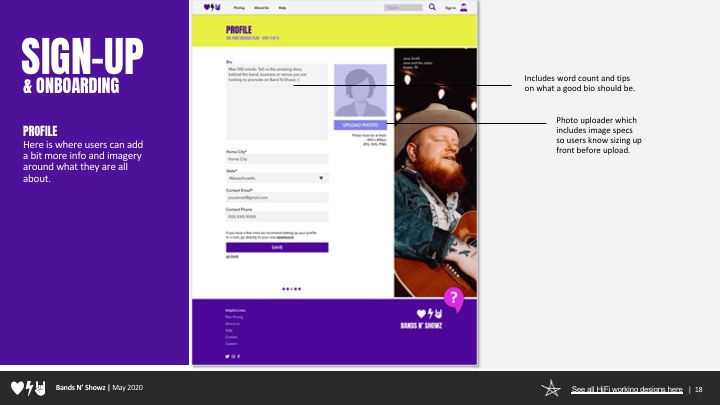


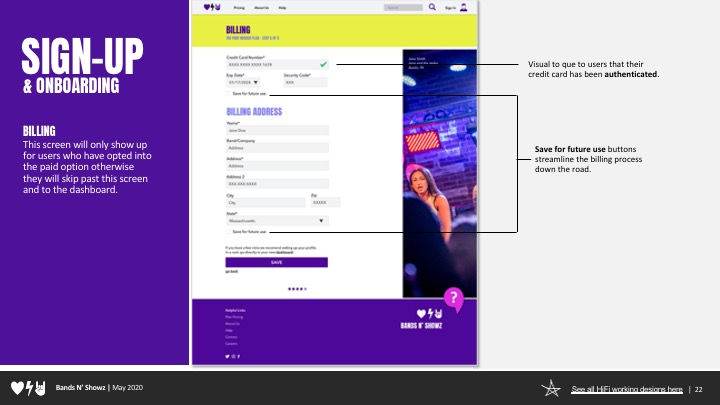

Using our testing insight from our gurilla testing here are some before and image of how we applied our tester feedback into our high fidelity mocks up in the next round.

This Section //
Test
What we tackled:
-
Our Test Plan
-
Round One Testing
-
Round One Results
-
Design Modifications
-
Round Two Testing
6. Build Our Prototype // Design
Building Our Working Prototype
Once we had our high fidelity designs created we used InVision to create a high fidelity working prototype for our users to test. Feel free to scroll though the screen below to get a feel for our design.
This computer screen is a working prototype click around on me!
Full screen working prototype
https://projects.invisionapp.com/d/main#/console/20027885/419518131/preview
![shutterstock_1722342391-[Converted].jpg](https://static.wixstatic.com/media/4325c1_2d914bbfa8fb4035961c55cceba47d33~mv2.jpg/v1/crop/x_392,y_708,w_4183,h_3617/fill/w_861,h_740,al_c,q_85,usm_0.66_1.00_0.01,enc_avif,quality_auto/shutterstock_1722342391-%5BConverted%5D.jpg)
This Section //
Test
What we tackled:
-
Our Test Plan
-
Round One Testing
-
Round One Results
-
Design Modifications
-
Round Two Testing
1. Our Test Plan // Test
Creating Our
Testing Plan
Before we stared testing our users
we wanted to create a solid game plan.
Explore the PDF on the right
to review the full plan.

2. Round One Testing // Test
Round One Testing Process
We interviewed six people that fit into the app's target demographics as moderated remote testing via zoom.
This was combined with insights from five unmoderated TryMiUi user testers to get an even more in depth look at the platform and how to improve our design.
3. Round One Results // Test
Round One Results
Insights We Are Looking to Gain:
-
Over First Impression - How would a first time user engage with the site what does it do?
-
Is the onboarding flow easy for users to engage with and understand?
-
Are users able to create a new show from scratch?
-
Are users able to set up a promotion plan that is tailored to their needs?
-
Can users add other administrators to their event?
You can review the full results here:
Top Findings
Problem
Solution
“Booking Magic” and “One Free Show” Language is confusing since we currently
do more promotion than booking.
-
Change home page language
from “Booking” to “Promotion”.
-
Maybe add a booking side to
the platform (down the road).
-
Explain “One Free Show” better say something like “Promote One Show Per Month”.
Sign In page should include language
for new users to create an account
-
Add a create new account link to the sign in/login landing page (this is standard on most sites).
-
Make clickable area in prototype larger
(it tripped some folks up)
All users wanted
the free option.
-
We changed the question we asked to assume they had budget. We are testing the paid option at this point, so it did not make sense to get caught up on the free option. Assume most users will most likely try the free option first but we are testing billing.
Progress bar during onboarding to keep
users engaged and/or make the skip
button more prominent.
-
Add progress bar to onboarding
-
Add profile status to home page
to get users to add to profile
-
Make the skip to dashboard button
more prominent.
4. Design Modifications // Test
Our Key Adjustments

Before

After
Home Page
1. Changed Language to be more clear about product offering.
Our service focuses more on Promotion/Fan Turnout and is not a booking platform (AKA Sonicbids).
"One Stop for Booking Magic" is now "One Stop for Gig Promo Magic".

Before

After
Pricing
1. Added Progress Bar
2. Reinforced promotion feature language.
3. Made Sure to keep the free option since we assume most users will try this first.

Before

After
Login
1. Added a call to action for new users. A lot of new folks went straight to this page in testing so we want to make sure there was an option for them to create a new accoutn here.

Before

After
Connect Accounts
1. Added Progress Bar
2. Included a "skip for now" option to opt out of this section and go directly to the dashboard. Some users wanted to test things out before they commited the time to connecting all their accounts.

Before

After
Dashboard
1. Added profile strength icon to encourage users to fully complete their profile.
2. Highlighted the Create Show option since that is our key feature.
3. Improved the way we display shows to include a call out to any shows you just added up top, then list upcoming shows by date order.
4. Changed language from "Show Invites" which people found confusing to "Pending gig requests". Also added a notation to draw attention to the pending gig requests using an new mail type of icon.

Before

After

Promo Wix
1. Broke on page into two pages. Users for there was too much going on here and it was confusing.
2. Added enhanced admin feature and clarity. Users can now see who they asked to be an admin on their show. We used Facebook as inspiration since most folks are familiar with that concept.
3. Made the show promo page more expansive with more options as to which connected accounts you are using when.
4. Included some plus up paid features on this page, with a better explination for the offering.
Updated Working Prototype
Full screen working prototype
https://projects.invisionapp.com/share/D4XHDNBWSVX#/screens
5. Round Two Testing Results // Test
Round Two Tesing Results
In this round we revisited some of the insights and changes we gathered in round one. We then did 6 moderated tests via zoom. Five of the users were new users and one was a return user.
Once we had a chance to really dive in with our testers we were able to address some confusion and pain points. We also found some other areas which would enhance our user experience moving forward in Round 2.
You can review the full results here:
Top Findings
Problem
Solution
How do I set which day I want something to post? AKA: like Tues but Tues June 12th and Not 16th?
-
Add a calendar day option to show promo scheduler.
-
Add a save button to the right where it updates what promoyou have going on thus far.
How do I make each post custom
without paying for someone to do it.
-
Add a text field for each new promo they want to create. This would allow them to set the text they want for each one if they so choose.
Is there a Automated count down?
-
Set up a best practice automated standard option that works. Such as: One Month Out, Two Weeks Out, Like One Week Out, Day Before, Day Of...
Admin page needs to be reworked a bit.
Overall expand flexibility and preferences.
-
Show whether or not they are a member on Admin when you enter email.
Like if they are a BNS user already…
-
Make this form auto populate if it is a user on the platform or someone you have connected with in the past.
-
Once you enter the email you are going to send you can specify what preferences there are. Check out Google doc for an example.
-
Make “x” just say pending
-
Add a marker for “owner” so you know
who is the event creator.
Show finish screens
-
Overall show finish screens in the next
round of prototypes if possible.
-
Make my profile clickable in the side nav.
Make this on all dashboard screens
-
Make Chatbot/Help Icon clicky with pop-up window.
-
Tighten prototype overall and make additional spots clickable where users have been tripped up.

This Section //
Results
What we tackled:
- Next Steps
- Recap
1. Next Steps // Results
Our Next Steps
Look into Hootsuite and HubSpot:
Might gain some good insights from those platforms.
Iterate on Prototype:
Continue to iterate on next round of prototype to address user concerns for the Admin page and some additional options from promo along with any small house keeping changes.
A/B test:
Do an A/B test for when the billing order should be placed during onboarding.
Case Study:
Build a really awesome case study from what we have so far.
Present with Confidence:
Present this a ladies that UX Lightning Talks in the future to get additional feedback on this presentation.
Find Funding:
Could I actually build this thing? Would people pay me to do this figure out how I would go about doing that…